Recallit: Save, Organize, find
Save links and PDFs, organize with tags, and find what you need—privately.
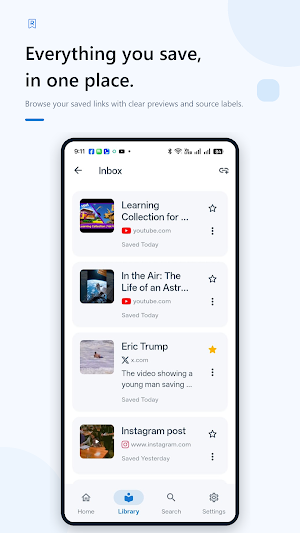
About Recallit: Save, Organize, find
RecallIt helps you save useful links and PDFs, organize what matters, and find it again when you need it.
Found an interesting article, TikTok, Reddit post, video, resource, webpage, or PDF you want to revisit? Instead of letting it disappear into browser tabs, chats, bookmarks, downloads, or screenshots, save it to RecallIt.
SAVE IN SECONDS
Share links directly to RecallIt from supported Android apps, add them manually, or import PDFs from your device.
RecallIt is designed to make capturing something worth remembering quick and simple.
SAVE & READ PDFs
Import PDFs directly into RecallIt and keep them alongside the rest of your saved library.
RecallIt can extract searchable text from supported PDFs, helping you find information inside your saved documents later. PDFs without extractable text can still be saved and viewed.
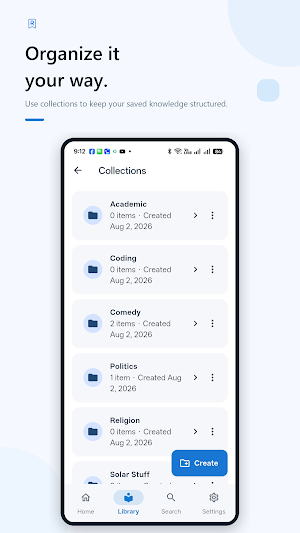
ORGANIZE YOUR WAY
Keep your saved content manageable with:
• Collections
• Tags
• Favorites
• Archive
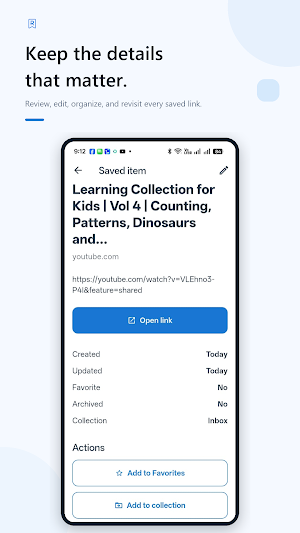
• Notes and editable details
• A dedicated PDFs view
Whether you're saving research, recipes, tutorials, inspiration, work resources, documents, or things to read later, RecallIt helps keep everything organized.
FIND IT AGAIN
Saving something is only useful if you can find it later.
RecallIt provides fast search across your saved library, including saved links, details, tags, and searchable PDF content, helping you get back to what you need without digging through old messages, browser tabs, downloads, or multiple apps.
SMARTER CAPTURE
RecallIt can retrieve available information from supported links to make saved items easier to recognize.
When a useful title is not available, RecallIt keeps the item editable so you can name and organize it your way.
SHARE WHAT YOU SAVED
Found something worth passing on?
Share saved links, videos, and available PDFs from RecallIt using Android's sharing options and compatible apps installed on your device.
BUILT FOR OFFLINE ACCESS
Your RecallIt library is stored locally on your device, so your saved information remains accessible even when you're offline.
Some optional features, such as retrieving online link information and displaying advertising, may require an internet connection.
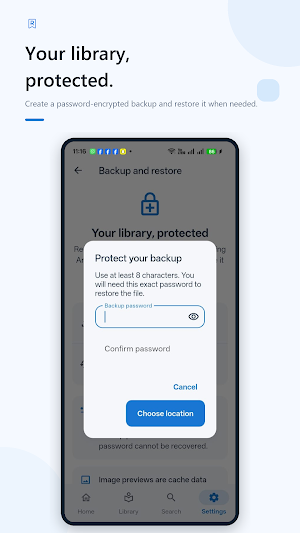
ENCRYPTED BACKUP & RESTORE
Protect your library with password-encrypted backup and restore.
RecallIt provides two backup options:
• Library Backup — backs up your RecallIt library and PDF records without including the PDF files themselves.
• Everything Backup — includes your library and available RecallIt-managed PDF files for a more complete restore.
This gives you greater control over what you back up and how much storage your backup uses.
DESIGNED FOR ANDROID
RecallIt includes:
• Android Share integration
• PDF importing and viewing
• Tags and bulk organization tools
• Light and dark themes
• Material 3 design
• Accessibility support
• Responsive navigation
• Offline-first functionality
PRIVACY-CONSCIOUS BY DESIGN
RecallIt is built around local ownership of your saved library. Core saved content is stored on your device rather than requiring a RecallIt cloud account.
Network access is used where needed for optional functionality such as retrieving online link information and displaying advertising.
WHY RECALLIT?
Because finding something useful shouldn't mean losing it later.
Capture it.
Organize it.
Find it again.
Recallit: Save, Organize, find details
Recallit: Save, Organize, find is a free Productivity app for Android with 5+ installs on Google Play. It was released on August 9, 2026 and last updated on September 1, 2026. It requires Android 7.0 or later. The app contains ads.
- Category
- Productivity
- Installs
- 5+
- Price
- Free
- In-app purchases
- No
- Ads
- Contains ads
- Current version
- 1.1.0
- Requires Android
- 7.0
- Content rating
- Everyone
- Released
- August 9, 2026
- Last updated
- September 1, 2026
What’s new in Recallit: Save, Organize, find
RecallIt V1.1 is here! • Save, view and search PDFs • Organize saved items with Tags • Smarter link and video capture • Share saved links, videos and PDFs • Improved search and bulk actions • New encrypted backup options for your library and PDFs • PDF viewing and navigation improvements • UI, accessibility and performance improvements • Bug fixes and stability improvements
Version 1.1.0 · Updated September 1, 2026