Money4you: Budget & Expenses
Track expenses, manage budgets, see where your money goes - all on your phone.
About Money4you: Budget & Expenses
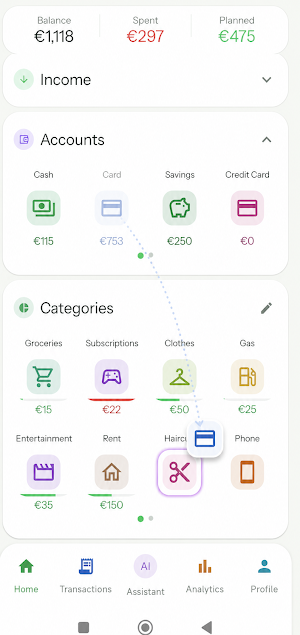
Money4you turns your budget into something you can actually see and touch. Every account, income source and spending category is a tile on one screen. To move money, drag one tile onto another — that's the whole gesture. No forms to fill in, no bookkeeping to learn.
BUILT AROUND HOW YOU ACTUALLY SPEND
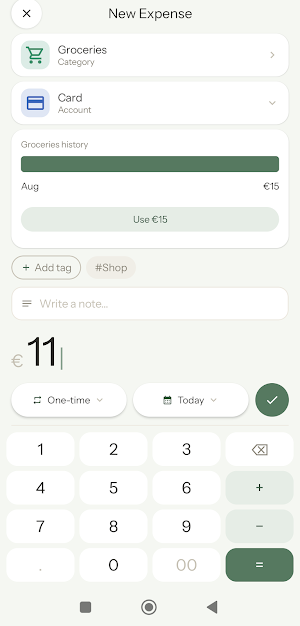
• Tap a category and type the amount — the keypad does the maths, so "50+30" just works
• Add a note, a tag, or the person involved
• Set a payment to repeat weekly or monthly and it keeps itself up to date
• Lend or borrow money, set a "return by" date, and get a reminder before it arrives
• See that category's last few months right where you type, so you know what normal looks like
AN ASSISTANT THAT WORKS OFFLINE
Ask a question, get an answer straight from your own numbers — no account, no API key, no internet needed:
• How much can I still spend this month?
• Am I over budget anywhere?
• Compare with last month
• What repeats every month?
• Show my spending by category
These are calculated on your phone, so the answers are exact rather than guessed at.
If you also want free-form conversation, you can connect your own Google Gemini key. Even then, only your monthly totals per category are shared — never your individual transactions, and never the notes you write on them.
UNDERSTAND WHERE IT WENT
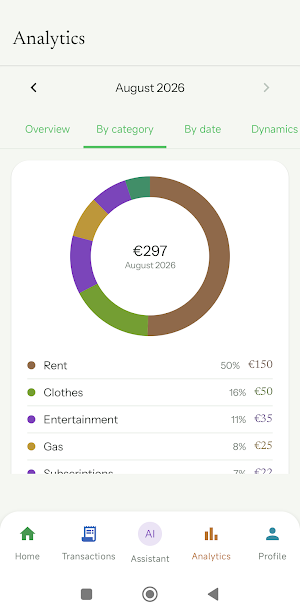
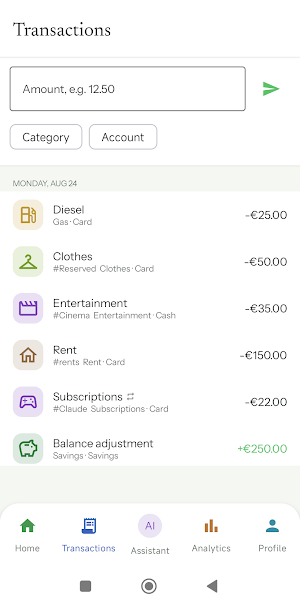
Analytics breaks your spending down five ways: an overview, by category, a calendar of daily spending, dynamics over time, and by tag. Swipe any transaction away to delete it.
YOUR DATA STAYS ON YOUR PHONE
Money4you keeps everything locally on your device. There is no cloud sync and no bank connection — your transactions are never uploaded. You can export a full backup to a file whenever you like and restore it later, so your data is yours to move.
MAKE IT YOURS
• Four colour themes: Daylight, Midnight Blue, Forest and Sand
• Rearrange tiles by dragging, the way you arrange your home screen
• 11 currencies, including USD, EUR, GBP, CHF, PLN, SEK, CAD, AUD, JPY, INR and RUB
• 10 languages, including English, Spanish, Portuguese, Italian and Turkish
FREE AND PRO
The free version covers everything above, with up to 8 spending categories.
Money4you Pro is a single one-time purchase — not a subscription — and adds:
• Unlimited spending categories
• App Lock with a PIN and fingerprint unlock
• A home-screen widget showing your account balances
• Six icon styles to restyle every category
• CSV export for spreadsheets
Sign in with an email address or your Google account to keep your setup safe.
Similar Apps

MoneyTool – Budget Tracker
Track spending, build wealth & stay private. No logins or ads.

Keepr: Money & Budget Tracker
Personal finance manager: Create budgets, track your spending, and save money

Casherwise: Budget & Expenses
Budget manager, an easy and efficient expense and income tracker

Beyond Budget - Budget Planner
Master your money with zero-based budgeting, smart forecasting, and more.

Budget Planner & App: Spendee
Money tracker & expense tracker. Plan budgets, track spending & save money!

Money manager & expenses
Money manager: easy and user-friendly app for tracking of your expenses
