

About Meme Diff: Homescreen
🛰️ MEME DIFF CONTROL CENTER
A launcher-based home screen experience built for quick app access, clean layout control, and a spot-the-difference puzzle right in your workspace.
🧭 LAYOUT CHANGE NOTICE
- 🔧 Setup Registration: Setting this app as your default launcher will refresh and adjust your home screen layout to support the built-in interactive setup.
- ↩️ Full Restore Support: If the new arrangement is not for you, you can return to your original system launcher anytime through device settings. The change is fully reversible.
🖼️ LAYOUT MODULE: MEME DIFF
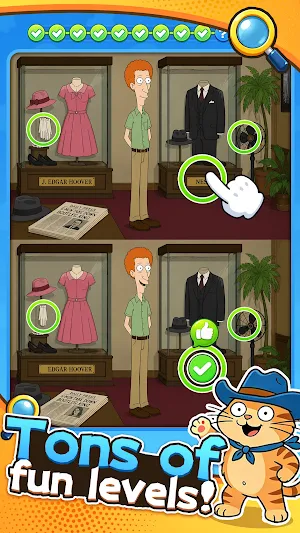
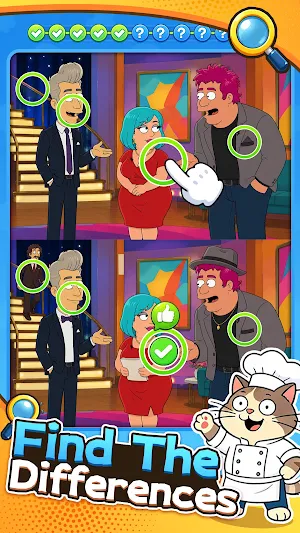
Jump into a lightweight, instantly playable difference-finding challenge built directly into the launcher:
- 🔎 Compare two nearly identical images and hunt down every hidden detail.
- 👆 Tap each difference as you spot it and clear the scene step by step.
- ✅ Finish all differences to unlock new themed scenes.
- ⚡ Instant play, no loading, no extra setup, just quick puzzle fun from your home screen.
🛠️ UTILITY DEPLOYMENT METRICS
- 📲 Default Launch Protocol - A simple setup guide helps you make this app your default home screen in just a few steps.
- 🚀 Express Application Access - Open your installed apps and daily tools quickly without lag.
- 🎛️ Compact Interactive HUD - Keeps lightweight interactive elements on screen without crowding your icons.
- 🧭 Swipe-Right Extension View - Swipe right from the main screen to reach a secondary shortcut panel.
- 💎 Reliable Grid Performance - Built with a lightweight framework for smooth, stable daily use.
🌿 MAINTENANCE & FREE ACCESS
This home launcher is free to use. Lightweight ads help support maintenance, updates, and ongoing improvements.
Similar Apps

Diggy Yum HomeScreen
Physics puzzle: eat all target balls.
Fluffy Otter Finder Desktop
Cozy otter puzzles: soft comfort, sharp logic

Text Summarizer
Effortlessly summarize any paragraph in your preferred language!
