VoxCue: Floating Soundboard
AI text-to-speech, voice recorder, audio manager and sharing tool
About VoxCue: Floating Soundboard
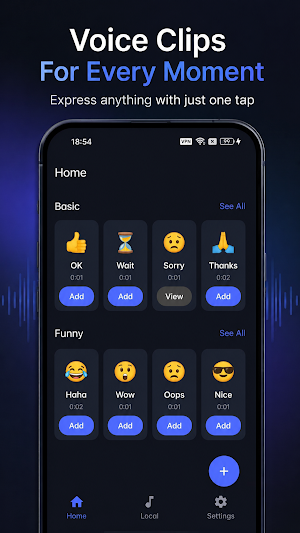
Voice Forward Tool is a local voice recording, AI text-to-speech, audio saving, voice management, and sharing app designed for fast and convenient communication.
Whether you want to record daily voice notes, save temporary recordings, organize chat audio, convert text into speech, or share audio files to other apps, Voice Forward Tool makes everything simple and easy.
The app allows users to start recording manually, save audio files locally, and share recordings through the system share panel. Users can also enter text, choose a female or male voice, and play the text as speech instantly. With AI text-to-speech generation, users can create natural voice audio from text and save it locally for chat replies, social media comments, short video voiceovers, and daily communication.
Voice Forward Tool is also helpful for deaf, mute, non-verbal, introverted, socially anxious, or speech-impaired users who need an easier way to communicate through voice playback and generated speech.
Key Features
HD Voice Recording
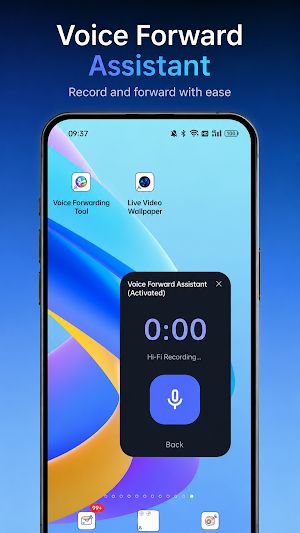
Start and stop recording manually and save clear audio files. Perfect for voice notes, temporary recordings, communication materials, and quick audio capture.
Text to Speech
Enter text and choose a female or male voice to play speech instantly. Useful for chat, expression, reminders, social interaction, and moments when speaking is not convenient.
AI Text to Speech
Use AI to generate natural-sounding voice from text and save it as a local audio file for playback, management, and sharing.
Local Audio Saving
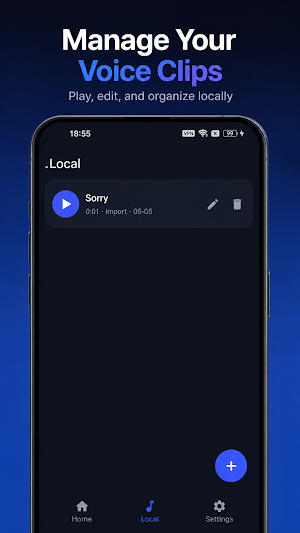
Recordings and AI-generated voice files can be saved locally, making it easy to play, rename, delete, and manage your audio anytime.
Audio Management
Manage recordings and generated voice files in a clear local list, helping you organize and find audio content more easily.
One-Tap Sharing
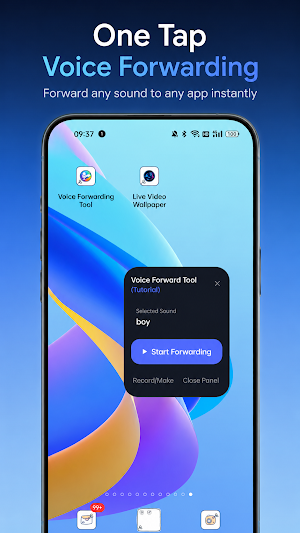
After recording or generating speech, you can manually choose a target app through the system share panel. Suitable for social chats, work communication, file transfer, social media comments, and content creation.
Floating Recorder
After enabling floating window permission, you can quickly open the recording panel while using other apps, reducing the need to switch screens frequently.
Voice Preview Playback
Preview recordings or generated speech before saving, deleting, or sharing.
Voice Communication Assistant
Helpful for deaf, mute, non-verbal, introverted, socially anxious, and speech-impaired users who want to communicate more easily with voice playback.
Social Media Voice Tool
Generate voice from text for chat replies, comments, short video voiceovers, livestream reactions, and social media expression.
Local Privacy Protection
Recordings and generated audio files are stored locally on your device. The app does not share your audio content in the background, helping you manage your voice files with more confidence.
Similar Apps

PetPal: Desktop Pet Companion
Adopt interactive screen pets or create a custom pet from your own photo.

NotifyGuard: Noti Manager
Private notification history, search, voice readout and custom alerts.

CalmWall
white noise & calming wallpapers for sleep, focus & relax
