withDR 2
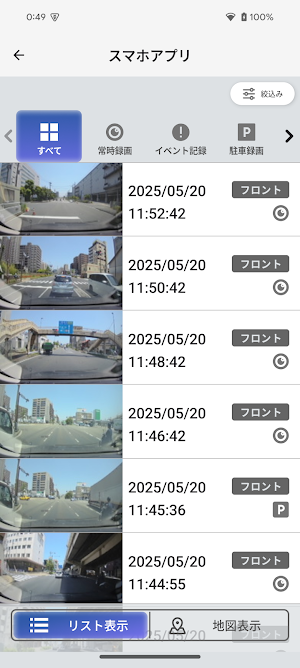
By connecting to a compatible dashcam via Wi-Fi, you can play and save videos stored in the dashcam on your smartphone.
About withDR 2
■ Main Features
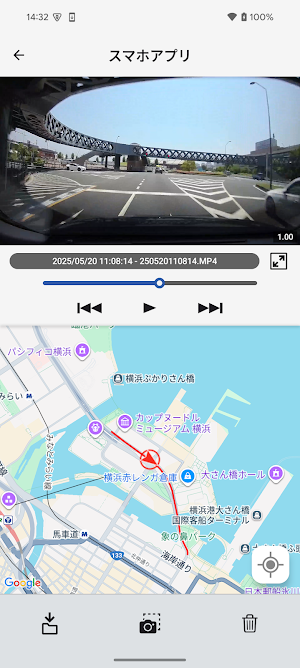
・Dash Cam Video Playback
Stream dash cam footage on your smartphone.
During playback, you can display your driving route on a map.
・Save and Play Video to Your Smartphone
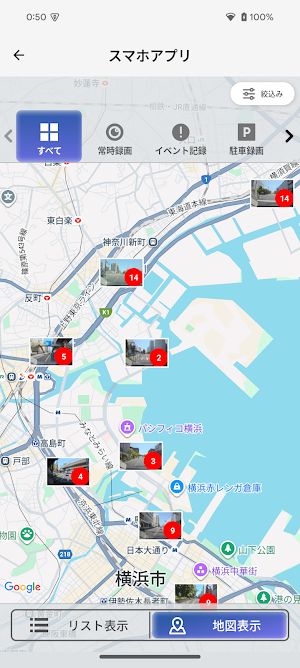
Save desired footage within the app. View footage with date, time, and location information at your fingertips.
Saved footage can be exported to a file for use outside the app.
・Live Video Display
Display dash cam footage on your smartphone and check the dash cam's coverage area.
・Operation and Settings Changes via the App
Configure various settings and recording operations from your smartphone.
■ Notes
・Our "withDR" and "withDR 2" apps are compatible with different dash cam models. Please refer to your dash cam's instruction manual in advance.
・Operation on all devices is not guaranteed.
・Some functions, such as operation and setting changes, may not be supported depending on the dash cam model. Please refer to your dash cam's instruction manual for details.
If you can't connect to Wi-Fi, please check that the following is not the case.
- Location information on your smartphone is not enabled.
- Enable "Use location information" from the settings screen of your smartphone.
Similar Apps
KENWOOD Remote
KENWOOD Remote is an application to control KENWOOD car receivers via Bluetooth®

JVC Headphones
Control various functions of JVC headphones.
Mirroring OB for KENWOOD
It is mirroring application for KENWOOD car AV receiver.
Mirroring OA for KENWOOD
It is mirroring application for KENWOOD car AV receiver.
JVC Remote
JVC Remote is an application to control JVC car receivers via Bluetooth®

KENWOOD Motorsports CAM
Motorcycle drive recorder dedicated application
