
SPS eLibrary
openserve Education
Application for reading eBook of SPS eLibrary.
- Downloads
- 300+
- on Google Play
- Price
- Free
- No in-app purchases
- Updated
- Nov 19
- 2024 · v2.20b
Screenshots
About SPS eLibrary
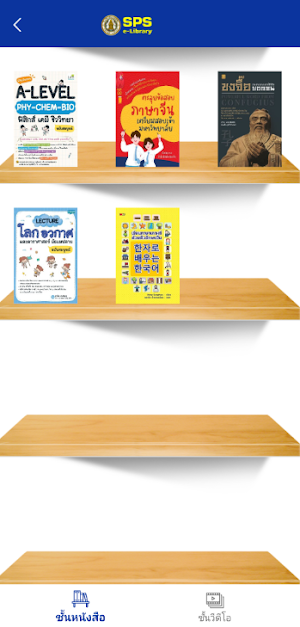
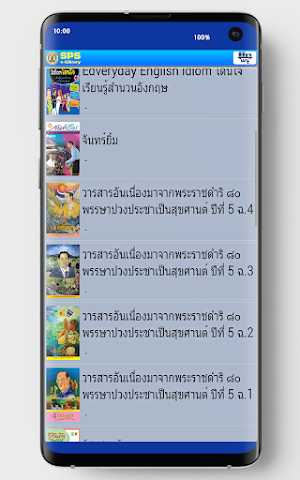
SPS eLibrary. It also has a feature that helps users organize and select various types of books by organizing them systematically.The library content can be displayed as follows: Showing the book title, cover, spine, or book list.The actual viewing is like flipping the pages of a real book. And the user can customize the customize various page display.
Scale: Users can adjust the display scale of pages, reduce the size, or perform zoom functions such as magnifying glass viewing by reading a borrowed book from the bookshelf.
Scale: Users can adjust the display scale of pages, reduce the size, or perform zoom functions such as magnifying glass viewing by reading a borrowed book from the bookshelf.
What’s new
Version 2.20b · Updated November 19, 2024
อัปเดตเมื่อ 2 พ.ย. 2567
Alternatives to SPS eLibrary
Looking for apps like SPS eLibrary? Here are 6 similar Android apps on Google Play. All of them are free to download.


| App | Rating | Price | Installs | Last updated | Compare |
|---|---|---|---|---|---|
| SPS eLibrary | – | Free | 100+ | Nov 19, 2024 | |
| Kongkaram e-Library | – | Free | 1,000+ | Dec 14, 2023 | Compare |
| SKN eBook | – | Free | 1,000+ | – | Compare |
| Sunpasit Digital Library | – | Free | 50+ | – | Compare |
| MV Library | – | Free | 1,000+ | – | Compare |
| T2K Digital Library | – | Free | 500+ | Nov 25, 2022 | Compare |
| VICC Library | – | Free | 100+ | – | Compare |
Compare SPS eLibrary with the top alternatives: ratings, updates, ASO score and keyword gaps →
Similar apps on Google Play
- Kongkaram e-Library
- SKN eBook
- Sunpasit Digital Library
- MV Library
- T2K Digital Library
- VICC Library
- RSTECH Digital Library
- UTW Library
- D.M.J. Digital Library
- SUTHI Digital Library
- CB Library
- NVC-LIBRARY
- TW Digital Library
- SWPK Digital Library
- Udomdarunee School Digital Lib
- Loengnoktha School Digital Lib
- MPS Library
- SRTC Digital Library
- PBRU eBook2
- OPS-ONE
- TUPP Digital Library
- Wat Donthong Library
- Pua School Digital Library
- TK Digital Library
- BICC Digital Library
- Surawittayakarn School Digital
- PTEC Digital Library
- Taphanhin Library
- PTC Library
- DDN Digital Library
- DP5 Digital Library
- NR Library
- RCAT Library
- WRCICE Digital Library
- KTL Digital Library
- Bungsamphan Wittayakom Digital
- Khon Kaen Vocational College
- UVC Digital Library
- BMW Library
- Chomsurang Digital Library
- Ben Digital Library
- NKPLe Library eBook
- Preeyachot School e-Library
- WRK Library
- Anubannongying Library
- Phibun Digital Library
- Amphawanwit eBook
- Yothinburana Digital Library
- MONTFORT e-Library
- SRN Library
- Suanchonlibrary
- Digital Cultural Library
- Sankamphaeng Library
- NARATHIWAT Library
- Siyanuson Library
- SK Thonburi Digital Library
- ACSP Library
- TUPPT Digital Library
- WC Digital Library
- T.P. Library
- Hatyaiwittayalai 2 Library
- BPW eBook
- SNR Library
- SBP Library
- SBW Library
- Hatyai Technical College
- U-Thong School e-Library
- Nongsua Library
- Lukhamhan e-Library
- PKC e-Library
- TYK e-Library
- BCC Digital Library
- SKW Digital Library
- Sarawittaya School eBook
- Samsen Library
- Pibul Library
- SKJ Digital Library
- Nongsaeng Digital Library
- RTNA eBook
- Photha e-Library
- KN Library
- SSO Digital Library
- nacc ebook
- chiangkham eBook
- visut ebook
- Sapphawitthayakhom eBook
- huayplu ebook
- Sukum Library
- Rajaprajanugroh 15 eBook
- CHK eBook
- BMP ebook
- Benchama Maharat e-Library
- RBRU e-Library
- HTP eBook
- Padungladvittaya eBook
- ORYOR Library
- WSRA eBook
- Seekan eBook
- SK eBook
- SKR Library
- CRU E-Library
- TUN eBook
- ATC-RTA eBook
- NTUN eBook
- VLD Openserve
- SCIENCE eBook DSS
- eBook UBRU
- NNK eBook
- ACP eBook
- BAAC eBook
- DDeBook
- Rajapark eBook
- DDeClass
