

Orbit
Doktar Productivity In-app purchases
Health and growth monitoring via satellite images without field visits.
- Rating
- 2.6
- 53 ratings
- Downloads
- 10K+
- on Google Play
- Price
- Free
- In-app purchases
- Updated
- May 9
- 2020 · v1.1.18
Screenshots




About Orbit
Orbit is a satellite backed smartphone application, allowing users to monitor their crops’ progress and to execute efficient field inspections.
Orbit can be used by farmers, agri-food players (FMCG companies procuring crops for food processing), agri-input players (seed, crop protection, and fertilizer companies) and public institutions.
Orbit users will enjoy achieving their yield and/or crop quality goals via informed decisions.
Orbit users will be able to;
• Monitor crop health and growth progress,
• Locate low performing zones within farms for inspection,
• Flag zones to be inspected and to share flags with fellow colleagues or agronomists,
• Identify problems in low performing zones and to apply corrective and/or protective actions,
• Observe results of their corrective and/or protective actions,
• Take photos of diseases, nutrition deficiencies, and other problems throughout the growing season to establish their own records,
• Access historic weather data and 5-day weather forecast,
• Ask agronomists 24/7 for agricultural support.
Orbit Mobile App represents satellite data in three different maps, each serving a unique purpose;
• Health Map shows the target field’s (or crop’s) biomass amount. The biomass amount is represented in brown (non-existent), orange (low), yellow (mid), light green (high) and dark green (very high). Users will be able to track plant growth and identify problematic areas by observing color changes throughout the growing season.
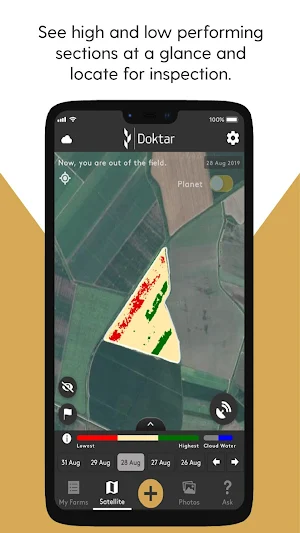
• Inspection Map shows high and low performing zones within the field. By only using three abstract colors; red (inspect), pastel yellow (skip, don’t inspect), green (skip, don’t inspect), Inspection Map allows users to easily identify low performing zones and focus their inspection effort to low performing areas only.
• Difference Map displays weekly changes within the field. Changes are reflected as blue (progressing), white (staying the same) and purple (regressing). Difference Map is the tool to follow up on whether corrective agronomic action has a positive impact or not. Difference Map can also be used to understand whether a crop has entered to harvest cycle or not.
During field visits or from outside of the field, it is possible to flag certain coordinates, add notes and photos whenever needed via Orbit App. The user can add notes regarding cultivation activities, label and group them as preferred.
For more information, please visit doktar.com
Orbit can be used by farmers, agri-food players (FMCG companies procuring crops for food processing), agri-input players (seed, crop protection, and fertilizer companies) and public institutions.
Orbit users will enjoy achieving their yield and/or crop quality goals via informed decisions.
Orbit users will be able to;
• Monitor crop health and growth progress,
• Locate low performing zones within farms for inspection,
• Flag zones to be inspected and to share flags with fellow colleagues or agronomists,
• Identify problems in low performing zones and to apply corrective and/or protective actions,
• Observe results of their corrective and/or protective actions,
• Take photos of diseases, nutrition deficiencies, and other problems throughout the growing season to establish their own records,
• Access historic weather data and 5-day weather forecast,
• Ask agronomists 24/7 for agricultural support.
Orbit Mobile App represents satellite data in three different maps, each serving a unique purpose;
• Health Map shows the target field’s (or crop’s) biomass amount. The biomass amount is represented in brown (non-existent), orange (low), yellow (mid), light green (high) and dark green (very high). Users will be able to track plant growth and identify problematic areas by observing color changes throughout the growing season.
• Inspection Map shows high and low performing zones within the field. By only using three abstract colors; red (inspect), pastel yellow (skip, don’t inspect), green (skip, don’t inspect), Inspection Map allows users to easily identify low performing zones and focus their inspection effort to low performing areas only.
• Difference Map displays weekly changes within the field. Changes are reflected as blue (progressing), white (staying the same) and purple (regressing). Difference Map is the tool to follow up on whether corrective agronomic action has a positive impact or not. Difference Map can also be used to understand whether a crop has entered to harvest cycle or not.
During field visits or from outside of the field, it is possible to flag certain coordinates, add notes and photos whenever needed via Orbit App. The user can add notes regarding cultivation activities, label and group them as preferred.
For more information, please visit doktar.com
What’s new
Version 1.1.18 · Updated May 9, 2020
Improvements are made and squashed bugs are fixed so Orbit is even better now. Please contact [email protected] for suggestions and requests.
Alternatives to Orbit
Looking for apps like Orbit? Here are 5 similar Android apps on Google Play. The highest rated is OneSoil Scouting: Farming Tool (4.5/5), and all 5 are free to download.
-
OneSoil Scouting: Farming Tool 4.5
-
Agrio - Precision agriculture 4.3
-
Farmdok
-
Field Navigator 4.5
-
Auto NPK Calculator 4.2
| App | Rating | Price | Installs | Last updated | Compare |
|---|---|---|---|---|---|
| Orbit | 2.6 / 5 | Free | 10,000+ | May 9, 2020 | |
| OneSoil Scouting: Farming Tool | 4.5 / 5 | Free | 500,000+ | Oct 15, 2026 | Compare |
| Agrio - Precision agriculture | 4.3 / 5 | Free | 500,000+ | Sep 19, 2026 | Compare |
| Farmdok | – | Free | 100,000+ | Jul 16, 2026 | Compare |
| Field Navigator | 4.5 / 5 | Free | 1,000,000+ | Jun 1, 2026 | Compare |
| Auto NPK Calculator | 4.2 / 5 | Free | 10,000+ | Jul 10, 2020 | Compare |
Compare Orbit with the top alternatives: ratings, updates, ASO score and keyword gaps →