
Sector Time Stop Watch
clawbridge Tools Contains ads
This is a stopwatch that can measure sector-by-sector times.
- Downloads
- 1+
- on Google Play
- Price
- Free
- No in-app purchases
- Updated
- Apr 2
- 2023 · v1.1.0
Screenshots
About Sector Time Stop Watch
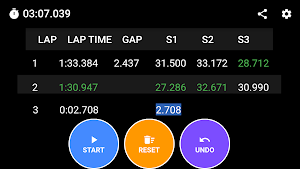
In motorsports, the circuit is divided into multiple sectors, and the time for each sector is compared with oneself or others to analyze where the lap time could be shortened or where time is being lost in which sector. Although a general stopwatch's split time function can measure the time for each sector, it cannot manage it per lap, making the measurement results difficult to read.
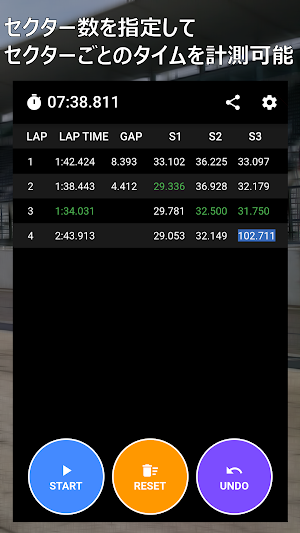
This app allows you to manage split time of the stopwatch just like a race timing monitor. It also displays the best lap, sector best, and the difference with the best lap in real-time. While it is common to measure one's time during motorsports with a GPS logger or lap timer, this app is optimal for confirming the driving pace in real-time from an external perspective or checking the pace of rivals.
Features:
- Displays measurement results in a timing monitor format
- The number of sectors can be set from 1 to 5
- The best lap and sector best are displayed in green, making them easy to see
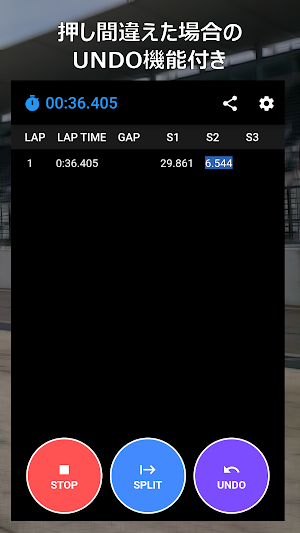
- The "UNDO" button allows the last split operation to be canceled. Even if you make a mistake, you can continue measuring without stopping the previous measurement.
- The vibration when pressing the button can be turned on/off.
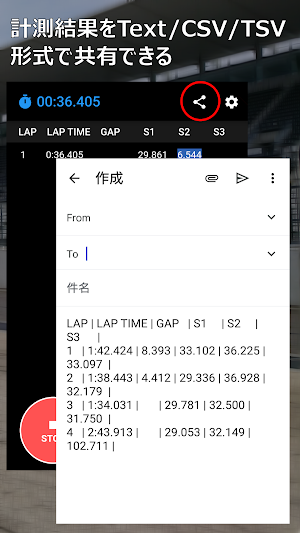
- The measurement results can be shared with other apps in text/CSV/TSV formats (This is a paid feature. Please purchase an upgrade from within the app).
This app allows you to manage split time of the stopwatch just like a race timing monitor. It also displays the best lap, sector best, and the difference with the best lap in real-time. While it is common to measure one's time during motorsports with a GPS logger or lap timer, this app is optimal for confirming the driving pace in real-time from an external perspective or checking the pace of rivals.
Features:
- Displays measurement results in a timing monitor format
- The number of sectors can be set from 1 to 5
- The best lap and sector best are displayed in green, making them easy to see
- The "UNDO" button allows the last split operation to be canceled. Even if you make a mistake, you can continue measuring without stopping the previous measurement.
- The vibration when pressing the button can be turned on/off.
- The measurement results can be shared with other apps in text/CSV/TSV formats (This is a paid feature. Please purchase an upgrade from within the app).
What’s new
Version 1.1.0 · Updated April 2, 2023
During measurement, make sure the device does not enter sleep mode.
Alternatives to Sector Time Stop Watch
Looking for apps like Sector Time Stop Watch? Here are 3 similar Android apps on Google Play. All of them are free to download.



| App | Rating | Price | Installs | Last updated | Compare |
|---|---|---|---|---|---|
| Sector Time Stop Watch | – | Free | 1+ | Apr 2, 2023 | |
| Tire Pressure Calculator | – | Free | 5+ | May 4, 2023 | Compare |
| 中華風一筆書き漢字サインメーカー | – | Free | 100+ | Jul 13, 2023 | Compare |
| Track Day Note | – | Free | 10+ | Mar 18, 2023 | Compare |