About HoneyLink Security
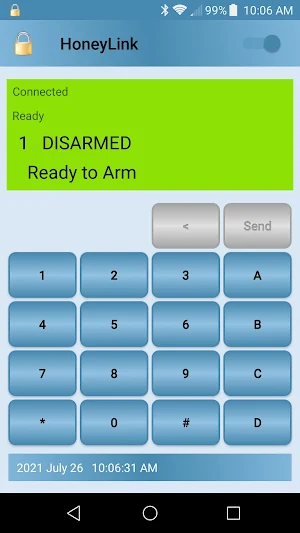
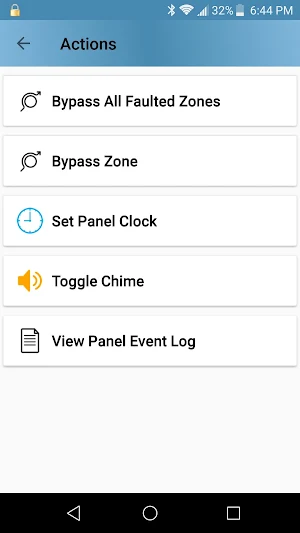
HoneyLink is a smart keypad for Honeywell Vista series security systems equipped with an Envisalink communications module. It emulates the behavior of a traditional alpha keypad but with enhanced features to improve ease of use. Common tasks are selected from menus instead of entering cryptic codes. Encoded screen output is translated to words.
Features:
• Real time access to alarm panel from your Android device.
• Application log records arm, disarm, alarm and other events.
• Chime notification of panel events. Arm, disarm, entry, alarm, etc.
• Foreground service remains connected to provide chime notifications while device is locked.
• Automatic reconnect if Envisalink connection is interrupted.
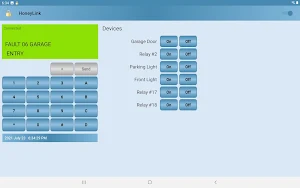
• Control alarm panel relay devices and on-board triggers.
• Customize function key labels.
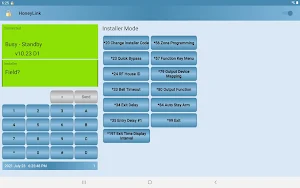
• Installer Mode programming assistance.
• Multiple partitions can be monitored simultaneously.
• Provides optimal layout depending on screen size and orientation.
Installer Mode Support
Most Installer Mode features can be programmed using HoneyLink (see Limitations). Context sensitive user assistance text is displayed for common programming options. Zones, Function Keys, Output Devices, etc. Abbreviated and encoded setting values are translated to descriptive text.
Zone Fault List
The Zone Fault List feature displays all faulted zones as a list of buttons that can be used to bypass a faulted zone.
Limitations
HoneyLink can only be used while attached to the local network that the Envisalink resides. The Envisalink module should not be made directly accessible from the internet due to security limitations.
Only one instance of HoneyLink can communicate with the Envisalink at any given time. The Envisalink will not respond to a second application if one is already attached. The first session will remain running, uninterrupted.
Installer Mode screens that utilize cursor position to edit values, cannot be programmed via HoneyLink because the Envisalink doesn’t provide the cursor position. *58 Zone Programming-Expert Mode and *82 Alpha Descriptor Programming are the most common screens that utilize cursor position editing.
Installer Mode context sensitive help is not supported on Vista 128BP, 250BP panels.
Relay devices are not supported on Vista 128BP, 250BP panels.
Hardware
For use with Honeywell Ademco Vista (10P, 15P, 20P, 21iP, 128BP, 250BP) alarm panel equipped with an Envisalink (3 or 4) IP communications interface module.
HoneyLink has no affiliation with Honeywell or EyezOn Envisalink.
HoneyLink Security details
HoneyLink Security is a paid House & Home app for Android with 10+ installs on Google Play and a 5.0/5 average rating from 1 rating. It was released on July 31, 2021 and last updated on August 1, 2024. It's developed by Off-Road GPS Maps. It requires Android 6.0 or later.
- Category
- House & Home
- Rating
- 5.0 / 5 (1 rating)
- Installs
- 10+
- Price
- $9.99
- In-app purchases
- No
- Ads
- No ads
- Current version
- 1.02
- Requires Android
- 6.0
- Content rating
- Everyone
- Released
- July 31, 2021
- Last updated
- August 1, 2024
- Developer
- Off-Road GPS Maps
What’s new in HoneyLink Security
Updated Android code libraries.
Version 1.02 · Updated August 1, 2024
Similar Apps

Pertama Property
Elevate your property journey with Pertama Property. Explore, connect!
Reli Contractor
Boost your contracting business with Reli! Claim projects & schedule installs.

Baitna
Our SaaS solution offers property owners an app for showcasing real estates.
HomeGate - Society Gate App
Simplify society management with tools for visitors, vehicles, and security

Me Energy
Permite monitorizar el estado de las baterías Me Lithium.

DocuSave
DocuSave helps you store and track your receipts and warranties—all in one place

