Simple To do list & Notepad
Stay organized with smart to-do lists & notes. Plan, prioritize, & achieve more!
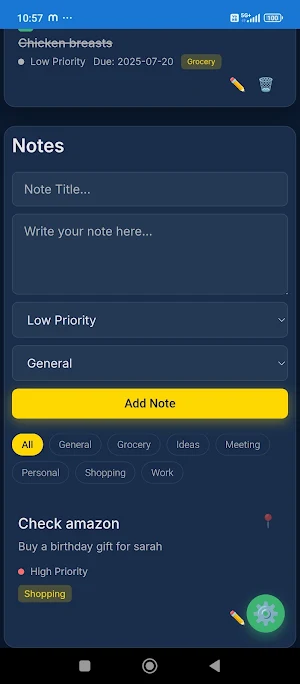
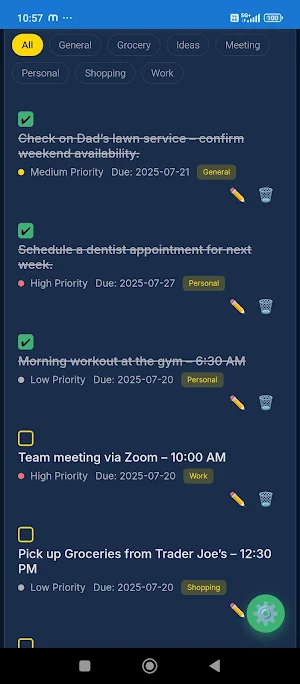
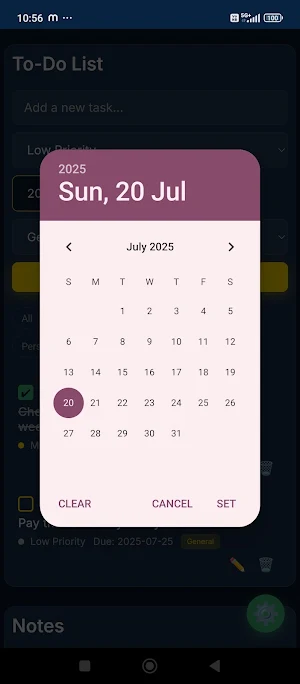
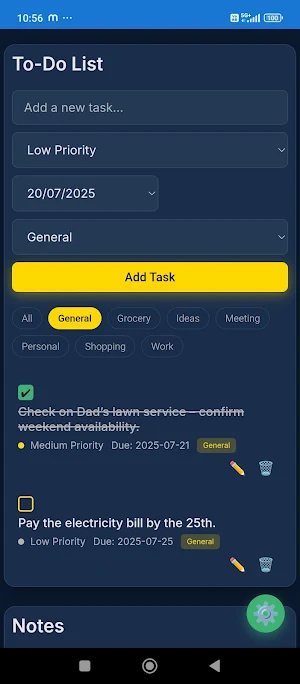
About Simple To do list & Notepad
Take control of your day with Premium Productivity, the elegant and intuitive to-do list app designed to boost your efficiency! Seamlessly manage tasks, prioritize your workload, and stay organized with a beautiful interface that adapts to your style. Whether it's for work, personal goals, or daily errands, this app helps you achieve more with less stress.
Key Features:
• Effortless Task Management: Quickly add, organize, and track your daily tasks and long-term goals.
• Intuitive Prioritization: Assign high, medium, or low priorities to tasks, visually indicating what needs your immediate attention.
• * Due Date Tracking: Never miss a deadline! Set due dates for each task and keep your schedule in clear view.
• * Smart Category Organization: Categorize your tasks (e.g., Work, Personal, Shopping) for better organization and easy filtering. Create and manage custom categories to fit your unique needs.
• * Dynamic Filtering: Instantly filter tasks by category to focus on what matters most at any given moment.
• * Completion Tracking: Mark tasks as completed with a satisfying check, visually tracking your progress. Completed tasks are clearly differentiated.
• * Edit & Update: Easily edit task titles, priorities, due dates, and categories anytime you need to adjust your plans.
• Simple Deletion: Remove tasks once they're done or no longer needed with a quick tap.
• Personalized Themes: Switch between Night Mode (dark theme) for a comfortable viewing experience in low light and Light Mode (bright theme) for crisp visibility during the day. * Accent Color Customization: Choose between a vibrant Gold or a refreshing Emerald accent color to personalize your app's look.
• Haptic Feedback: Enjoy subtle haptic vibrations for a more tactile and responsive user experience.
How to Use:
Adding a New Task
1. Enter Task Title: Type your task into the "Add a new task..." input field at the top of the screen.
2. Set Priority: Select "Low Priority", "Medium Priority", or "High Priority" from the dropdown menu. High priority tasks are marked with a red dot.
3. Choose Due Date: Tap the date input field to select a due date for your task from the calendar.
4. Assign Category: Select an existing category from the dropdown (e.g., General, Work, Personal) or add a new one via the settings.
5. Add Task: Tap the "Add Task" button. Your task will appear in the list.
Managing Tasks:
• Mark as Complete: Tap the checkbox next to a task to mark it as completed. The task title will be struck through, and the checkbox will turn emerald green. Tap again to unmark.
• Edit a Task: Tap the pencil icon ( ) next to a task. The task details will transform into editable input fields.
o Modify the title, priority, due date, or category as needed.
o Tap the "Save" button to apply changes or "Cancel" to discard them.
• Delete a Task: Tap the trash can icon ( ) next to a task. Confirm your action in the prompt to permanently delete the task.
Filtering Tasks by Category
• At the top of your task list, you'll see a row of category filter buttons (e.g., All, General, Work).
• Tap any of these buttons to display only the tasks belonging to that specific category.
• Tap "All" to view all your tasks regardless of category.
Personalizing Your Experience (Settings) :
1. Tap the gear icon ( ) located at the bottom right corner of the screen to open the settings modal.
2. Night Mode: Toggle the switch next to "Night Mode" to enable or disable the dark theme.
3. Accent Color: Tap the "Toggle Accent" button to switch between Gold and Emerald as your app's primary accent color.
4. Manage Categories:
o Add a New Category: Type a name into the "New category name..." input field and tap "Add".
o Delete a Category: In the list of categories, tap the "✕" button next to the category you wish to delete
5. Tap the "✕" button at the top right of the modal or tap outside the modal to close settings.
Similar Apps

Parachute Drop Pro
Ready for the ultimate skydiving adventure? Take the plunge and test your...

Once Click Spending Tracker
Monthly Spending Expense Tracker is an app that help you to visualise...

Car Depreciation Calculator
Car Depreciation calculator is a simple yet powerful tool designed to help...

Flower Match Mania - Relaxing
Welcome to Flower Match Mania - Relaxing Vibe, where a perfect balance...
