Bluetooth Keyboard Controller
Instantly turn your smartphone into a Bluetooth keyboard to control your devices
About Bluetooth Keyboard Controller
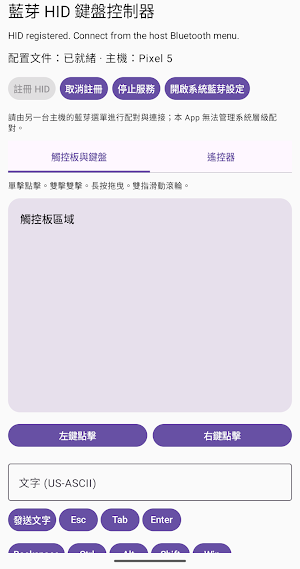
Bluetooth HID Keyboard Controller: Transform your smartphone into a Bluetooth keyboard, mouse touchpad, and multimedia remote—no drivers or account logins required. It connects directly to computers, phones, tablets, or any device supporting Bluetooth keyboard pairing via the standard HID (Human Interface Device) protocol.
Three Main Function Tabs
Please Note
This app requires your phone to support the Android Bluetooth HID peripheral role (supported by most devices running Android 9 or later, though not all). The target device (computer or other device) must also support receiving Bluetooth HID peripheral connections. Actual compatibility depends on the specific devices and operating systems involved; we recommend testing the connection.
This app does not collect or upload any text you input, mouse movements, or personal data; all actions are transmitted directly to your paired device via Bluetooth.
• Touchpad — Move the cursor with one finger; single-click/double-click; long-press to drag; scroll up/down with two fingers; plus dedicated left and right mouse buttons.
• Keyboard — Supports batch text input; standard keys like Esc, Tab, Enter, and Backspace; modifier keys (Ctrl, Alt, Shift, Win); and shortcuts for Copy, Paste, Cut, Undo, and Select All.
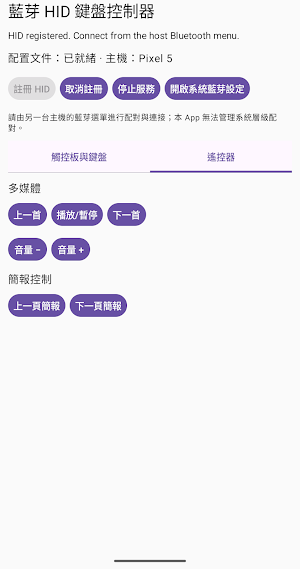
• Remote Control — Media controls (Previous/Play-Pause/Next, Volume) and presentation controls (Previous/Next Slide); ideal for binge-watching shows in the living room or giving presentations in meetings.
Use Cases
Control a TV-connected PC from the sofa, advance slides remotely during a meeting, or manage devices when a mouse or keyboard isn't handy—as long as you have your phone, you can connect to and control any device that supports Bluetooth HID peripherals.
How to Use
1. Open the app and grant Bluetooth and notification permissions.
2. Tap "Register HID," then go to the Bluetooth settings on your target device (PC, TV box, etc.) to search for and connect to "Android HID Controller."
3. Once connected, you can use the Touchpad, Keyboard, and Remote Control tabs to operate the device.
Similar Apps

Sunsational Swim Instructor
Find/manage swim clients, schedule lessons, track progress & access resources.

PDK Access by ProdataKey
Mobile access, trusted security—unlock doors with your phone.

Sleep Number
Proven quality sleep, only with your Sleep Number smart bed.

Hello Heart • For heart health
Heart health made easy

Well Digital
Your daily health partner
Cubii
Track your workday workout on your Cubii smart desk elliptical trainer.
