Smart Lock Screen OS 18
Lockscreen drawing, PIN lock, time password & live wallpapers - All in one app
About Smart Lock Screen OS 18
Please read before use
If you’re too tired of the boring default lock screen, then Smart Lock Screen OS 18 is here to revolutionize the way you unlock your phone. Explore innovative features that seamlessly combine functionality with style.
Custom Lock Styles
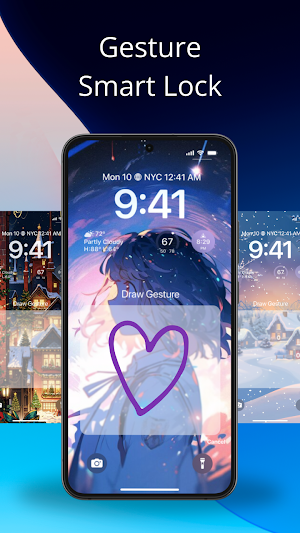
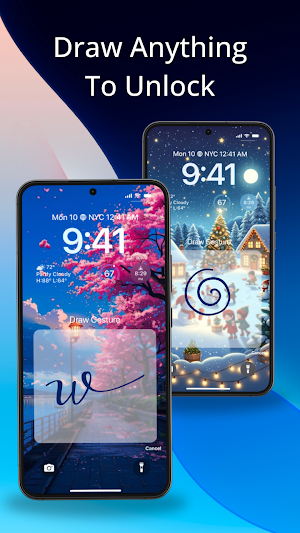
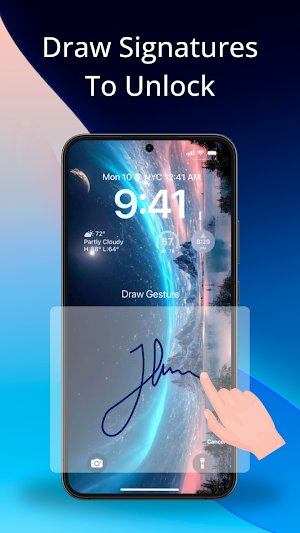
• Gesture Lock Screen Draw: Draw a gesture to unlock your phone. Could be a circle, a star, a heart or any shape you like.
• PIN Lock: Add a layer of security with a simple and clean 4-digit PIN code.
• Time Lock: Use the current time as your password. Simply enter the time displayed on your phone to unlock.
More Exciting features
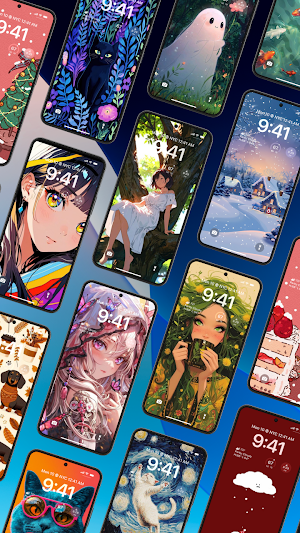
• Set as Live Wallpaper & OS 18 Lock Screen: Choose from a variety of live backgrounds, including abstract, architecture, animals, and more.
• Hide Lock Screen on Incoming Calls: Enjoy uninterrupted calls by temporarily disabling the lock screen.
• Customizable Wallpaper: Easily change text fonts, colors, and widgets like the clock, calendar, and device information.
How to Use Smart Lock Screen OS 18
Set Up Gesture Lock
• Open the app and navigate to the Gesture Lock section
• Create a new gesture, modify an existing one, or remove a gesture as needed
Set Up PIN Lock
• Go to the PIN Lock section and input your desired 4-digit PIN code
Set Up Time Lock
• Access the Time Lock settings and select your preferred password style (e.g., current time, PIN + current time, etc.)
• Configure the chosen method to match your preferences
Why choose Smart Lock Screen OS 18?
With Smart Lock Screen OS 18, you can completely personalize your lock screen. Combine sleek OS-style passcodes with beautifully themed wallpapers for a unique lock screen experience that reflects your style.
Ready to transform your lock screen? Experience a perfect blend of security, customization, and style. Download now and make your device truly yours!
Note: Smart Lock Screen OS 18 works best when you disable your device’s default lock screen.
Smart Lock Screen OS 18 details
Smart Lock Screen OS 18 is a free Personalization app for Android with 1,000+ installs on Google Play. It was released on December 12, 2024 and last updated on December 19, 2024. It's developed by EVER SOCIETY INC. It requires Android 7.0 or later. The app contains ads.
- Category
- Personalization
- Installs
- 1,000+
- Price
- Free
- In-app purchases
- No
- Ads
- Contains ads
- Current version
- 1.0.6
- Requires Android
- 7.0
- Content rating
- Rated for 3+
- Released
- December 12, 2024
- Last updated
- December 19, 2024
- Developer
- EVER SOCIETY INC
What’s new in Smart Lock Screen OS 18
Smart Lock Screen OS 18
Version 1.0.6 · Updated December 19, 2024
Alternatives to Smart Lock Screen OS 18
Looking for apps like Smart Lock Screen OS 18? Here are 6 similar Android apps on Google Play. The highest rated is Emul8 GBA Emulator (4.7/5), and all 6 are free to download.
Emul8 GBA Emulator
Why Choose Emul8 GBA Game Emulator?✅ Built for Retro Lovers: Revisit beloved...
Launcher OS 18
Do you want to move to OS 18?Launcher OS 18 is here...

My Year Prediction
In 2025, what would you be? Let’s find out the future with...
GPS Calculator: Land Measure
Easy to use, useful app for an area, distance and perimeter management.This...
CPU Monitor: Phone Temperature
🔥 CPU Monitor: Phone Temperature 🔥Stay on top of your phone’s performance...
Dumby: Minimal Phone Launcher
🤔 How many hours a day do you spend on your phone?If...
| App | Rating | Price | Installs |
|---|---|---|---|
| Smart Lock Screen OS 18 | – | Free | 1,000+ |
| Emul8 GBA Emulator | 4.7 / 5 | Free | 5,000+ |
| Launcher OS 18 | 4.2 / 5 | Free | 10,000+ |
| My Year Prediction | – | Free | 5,000+ |
| GPS Calculator: Land Measure | – | Free | 100+ |
| CPU Monitor: Phone Temperature | – | Free | 500+ |
| Dumby: Minimal Phone Launcher | – | Free | 500+ |
