EasyDoc:PDF Edit Reader
Read, sign, merge & scan PDFs. Simple tools for everyday documents on your phone

About EasyDoc:PDF Edit Reader
EasyDoc: PDF Edit Reader helps you open, manage, and work with PDFs and common document formats on your Android phone—without a desktop editor.
Read a contract, scan a receipt, merge homework files, password-protect a tax form, or add your handwritten signature before emailing it back. EasyDoc focuses on practical tasks you actually run into at work, school, and home.
DOCUMENT LIBRARY
Find & organize your files
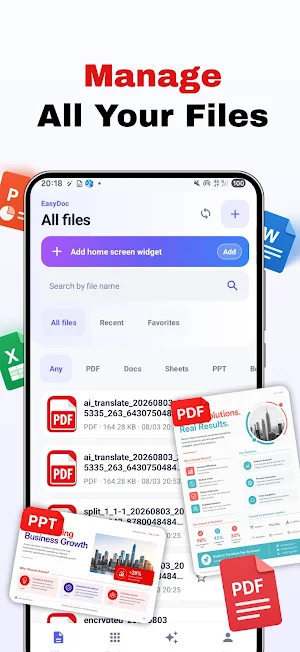
EasyDoc scans your phone for PDFs and Office files (when storage access is allowed). Import files manually anytime. Sort by recent, name, size, or type. Filter by PDF, Word, Excel, PowerPoint, or eBooks. Star favorites and jump back to recently opened files.
Merge PDF
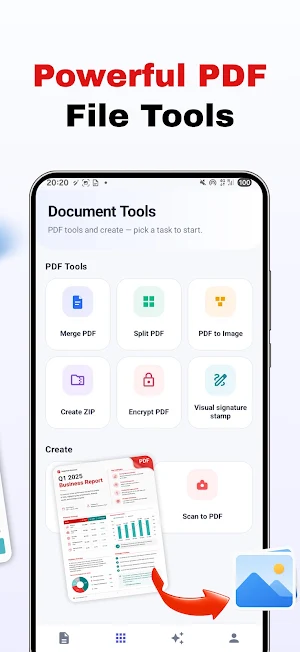
Select two or more PDFs and combine them into one file. Numbered badges show merge order—use the up/down arrows to change the order before merging.
Example: Combine a W-4, direct deposit form, and employee handbook into one file for HR upload.
Split PDF
Split one PDF into multiple files by page range (e.g., 1-3,5,7-8).
Example: Extract only the pages you need to submit from a larger assignment packet.
Sign PDF (handwritten stamp)
Draw your signature with your finger and place it on a chosen page. Save the signed PDF to share or email.
Example: Sign a lease, NDA, or consent form on your phone and send it back—no printer or scanner required.
Note: This is a visual signature stamp you draw and place—not a certified digital signature or legally verified e-sign platform.
Encrypt PDF
Add a password (minimum 4 characters) to protect a PDF before sharing.
Example: Lock a tax document or medical record so only someone with the password can open it.
Image to PDF
Pick photos from your gallery, reorder pages with up/down controls, and create a multi-page PDF.
Example: Turn photos of whiteboard notes or handwritten recipes into one PDF to share.
Scan to PDF
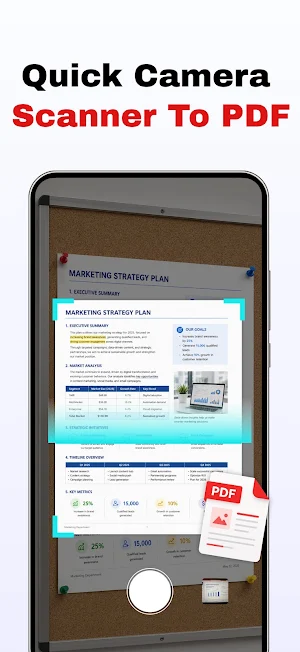
Use your camera to capture pages one at a time and build a PDF.
Example: Digitize a paper form at a clinic, a signed receipt, or a one-page document on the spot.
PDF to Image
Export PDF pages as JPEG images saved to your gallery.
Example: Save a single page as an image when a website or form only accepts picture uploads.
Create ZIP
Select multiple documents and pack them into one ZIP file.
Example: Bundle a resume, cover letter, and portfolio samples into one attachment for a job application.
UNDERSTAND DOCUMENTS FASTER
Translate PDF text
Extract text from a PDF and translate it online into your chosen language. View results side by side and export a translated PDF when done.
Example: Read a product manual or travel guide that arrived in another language.
Note: Translation requires a network connection. Quality depends on the translation service; best for general reading, not legal or medical precision.
Summarize PDF text
Get an overview, key points, and keywords extracted from PDF text on your device.
Example: Skim the main ideas in a long report before a meeting.
Note: Summary is generated from extracted text on-device—it is a quick overview, not a full AI chat analysis.
OFFICE & TEXT FILES
Open Word (DOCX), Excel (XLSX/CSV), PowerPoint (PPTX), TXT, and EPUB inside the app for preview.
Example: Open a .docx brief from a colleague or an .xlsx expense sheet from your landlord without installing separate Office apps.
OTHER BASICS
Open from other apps — Use "Open with EasyDoc" when someone shares a PDF or Office file
Import files — Add documents from your phone or file picker
Favorites & Recent — Quick access to starred and recently opened files
Themes — Light, dark, or follow system
App UI languages — English, Spanish, Japanese, Korean, French, German, and more
EasyDoc: PDF Edit Reader — read, organize, sign, scan, and handle everyday PDF tasks on your phone.
