About My Clinic for dentists
In this app there are three sections "Patients", "Sessions and Treatments" and "Payments".
In the "Patients" section, doctor can add patients, delete, and edit the information, also he can add X-Ray image for the teeth of the patient. And he can search in the patients list.
In the "Sessions and Treatments" section, doctor can get the number of sessions for each patient, and he can add sessions and the date for each session.
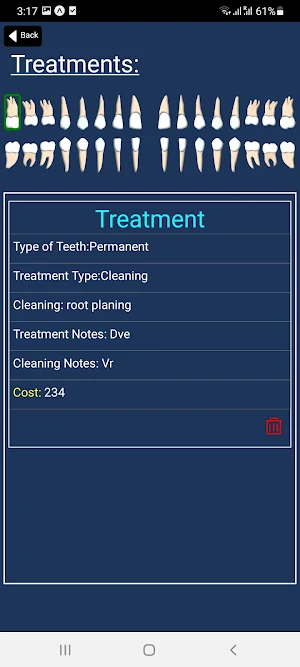
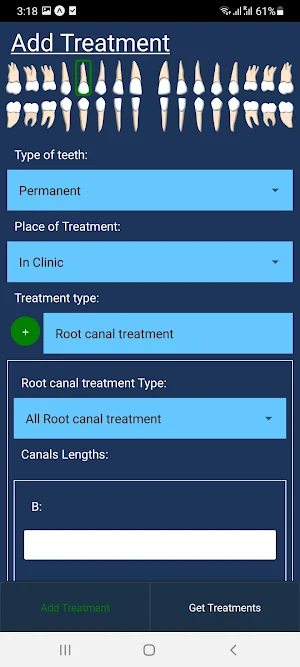
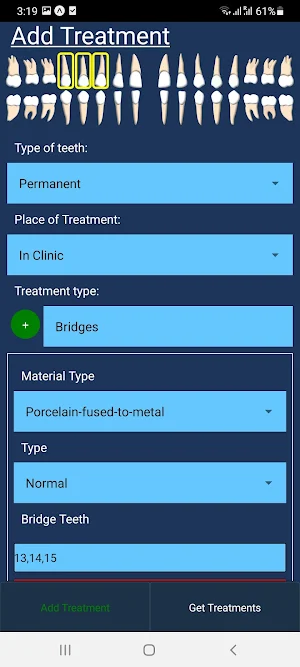
In the "Treatments page" there are two sections, "add Treatment" and "Treatments", so doctor can add, delete and edit treatments, each treatment has a specific details to add.
So after he added the session, he will navigate to the "add treatment" page, and he can choose the type of the teeth, pick a tooth and enter the treatment details.
Doctors can know the "place of the treatment" if it is "in" or "out" the clinic by the color of the border, Green for "in clinic" and red for "out clinic"
In the payments section, Doctor can add payments and the date for each payment also delete and edit the information. And he can get all costs, all payments, and the balance for each patient.
Similar Apps

Beekman 1802
Download the Beekman 1802 app to access exclusive discounts, early access to...

Blue Sky Vitamin
Authorized online retailer of the highest quality doctor-trusted nutritional vitamins & supplements...
Dental Hygiene Mastery NBDHE
★ PASS the NBDHE exam 200% guaranteed with Dental Hygiene exam prep!...

telemon
Monitor vital signs, share data with your doctor, and stay ahead of...

Baby Tracker by Sprout
Baby Tracker by Sprout, named a “Best Baby Tracker” by Forbes Health,...

MAPs ABC
Users participate in this program as part of a research study for...
